Fotor–AI Photo Editor & Filter
AI Art Photo Editor | Everimaging Ltd.Photography
4.320.32K Reviews
- Version
- 8.2.11.2
- Installs
- 10.00M
- Age Rating
- Teen
Screenshots
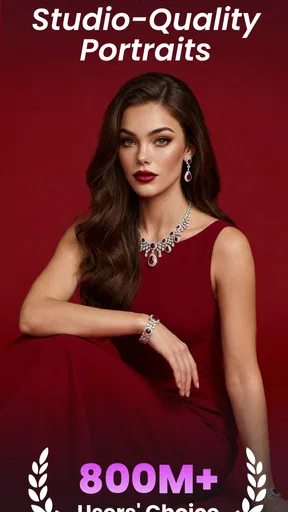

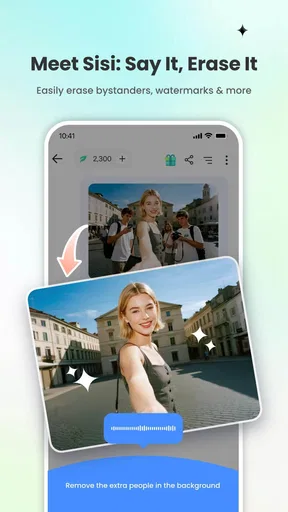
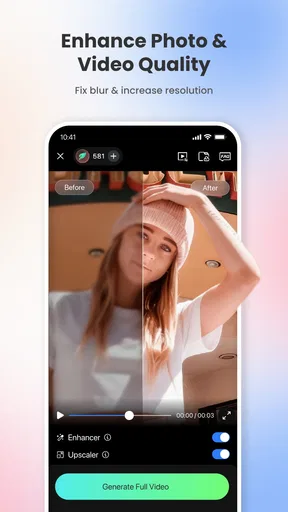
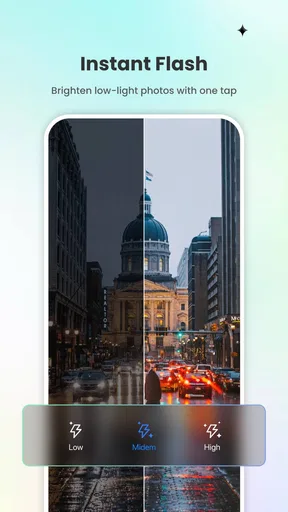
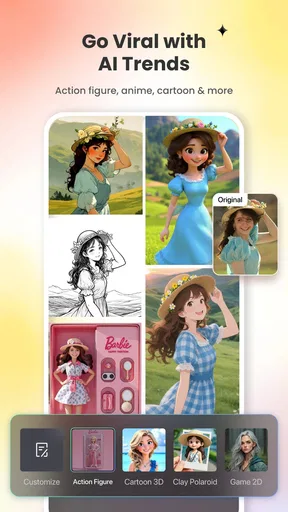
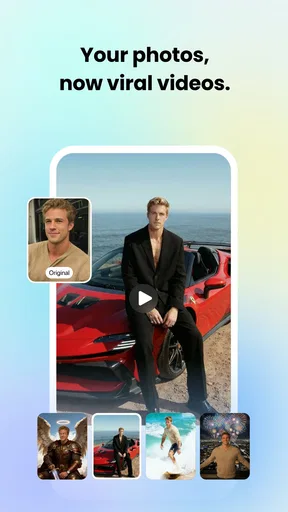
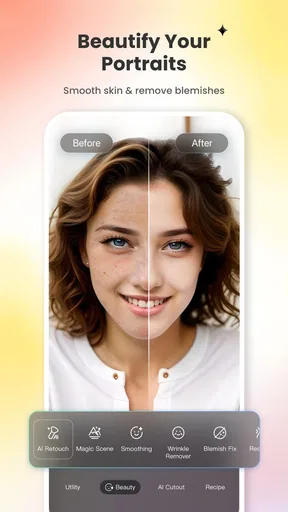
Our Review of Fotor–AI Photo Editor & Filter
 Analysis by Appyee
Before choosing a photo editor, I’d ask myself what I actually need to do after taking a picture. If I mainly want to brighten a dim snapshot, crop a portrait, or make a quick graphic without opening several apps, Fotor–AI Photo Editor&Enhancer is worth a look. It brings photo adjustments, AI-assisted editing, collage-making, and design work together, which is handy when convenience matters more than building a highly specialized editing workflow.
Start with the job, not the feature list
I find it useful to separate everyday edits from deliberate, detailed ones. An automatic enhancement can be a good first pass when a photo looks flat, but it is not a substitute for deciding what the image should feel like. For a family snapshot, I might want natural skin tones; for a travel photo, I may prefer richer color. The sensible approach is to treat AI as a starting point, then judge the result at normal viewing size before keeping it.
That distinction also helps set expectations. A broad editor is most valuable when I want to move between tasks quickly. If I spend most of my time shaping a single image with precise, repeatable adjustments, a more specialized editor may suit me better. Fotor’s appeal is the mix: it can take me from a basic correction to a collage or a simple promotional graphic without making me learn a separate app for each job.
Who is likely to get the most from it?
I’d recommend it first to casual photographers, social media users, and anyone who wants a practical editing toolkit without a steep learning curve. It is also a reasonable fit for someone who creates occasional invitations, cards, or posts and would rather start from a template than design a layout from a blank canvas. The choice of basic and more advanced adjustments gives curious beginners room to experiment as their eye improves.
It may be less satisfying if your priority is a strict, professional retouching process or a carefully controlled color workflow. Automatic enhancement can make a photo look punchier, but “better” is subjective: a brightened face or stronger contrast may not match the mood you intended. I’d keep the original image and compare before-and-after rather than assuming an AI edit is automatically the right one.
First Impressions
So, diving into the app, the first thing that caught my eye was its sleek and user-friendly interface. It’s like it knows exactly where my brain wants to go next. No fuss, no muss—just straightforward editing tools ready to make my photos pop. The app doesn’t overwhelm with too many options right off the bat, which I totally appreciate.
The Magic of AI
One of the standout features here is the AI component. Fotor–AI Photo Editor&Enhancer uses artificial intelligence to help enhance your photos automatically. This means that even if you’re not a pro at photo editing, you can still get some pretty professional-looking results. I tried it out on a few selfies and landscape shots, and the enhancements were subtle but effective—like having a mini professional editor in my pocket.
One practical way I’d use that automatic pass is for pictures taken in uneven light: I’d check whether it lifts the darker areas without washing out the bright ones, then make a small manual correction if the balance feels off. This is a useful trade-off to understand: automation saves time, but a quick visual check protects the character of the shot. For portraits, I’d also compare the face with the original rather than judging the edit only by how vivid the whole image looks.
Editing Tools Galore
When it comes to manual editing, Fotor doesn’t disappoint. The range of tools is impressive: from basic adjustments like brightness and contrast to more advanced features like curves and HSL. You can also play around with filters that range from vintage vibes to modern aesthetics. And if you’re into adding a personal touch, the stickers and text options are pretty fun to use.
Curves and HSL are particularly useful when a preset gets most of the way there but pushes one color too far. I’d make one adjustment at a time, then revisit the image at its full view; it is easy to overdo saturation while zoomed in on a small part of a phone screen. A filter can establish a quick look, while those controls give me a way to pull it back toward the actual scene instead of accepting the preset unchanged.
Collage Maker & More
For those who love creating collages, Fotor has a built-in collage maker that’s super easy to use. You can choose from a variety of templates or go freestyle. It’s perfect for crafting those Instagram-worthy posts or scrapbooking digital memories. Plus, there are design tools that let you create cards, posters, and even social media graphics.
A realistic use for this combination is putting together a small set of photos from a weekend outing: I can choose the strongest frames, arrange them in a collage, and add a short caption instead of posting several images separately. I’d keep the number of pictures modest and check that faces remain large enough to see after the layout is cropped for its destination. The template gets the composition started, but restraint with text and decoration usually makes the finished result easier to read.
Performance and Usability
Performance-wise, the app runs smoothly on both Android and iOS. I didn’t experience any lag, which is a big win in my book. The loading times are quick, and switching between features is seamless. Usability is definitely a strong point here, making it accessible for beginners and seasoned editors alike.
For a dependable routine, I’d edit a copy or keep the untouched original available, especially when trying a strong filter or a major tonal adjustment. That simple habit makes experimentation low-risk: if I change my mind later, I can return to the source rather than trying to undo a chain of edits. It also helps when I’m preparing different versions of one photo, such as a natural-looking image for a family chat and a more stylized one for a post.
What the all-in-one approach changes
Compared with a basic gallery editor, Fotor is more appealing when the job extends beyond cropping and a quick brightness adjustment. The extra controls and creative tools can save a trip to another app, especially if I want to turn edited pictures into a collage or a designed card. Compared with a dedicated retouching or desktop-style editor, though, an all-in-one mobile app is not automatically the better choice: a specialist may offer a more focused workflow for someone who edits the same way every day.
That is why I would choose based on the final output. For a quick portrait touch-up, a small collage, or a social graphic, the breadth is useful. For meticulous work where I need consistent results across a large set of images, I would favor a tool built around that particular task. Fotor sits in the middle: more flexible than a bare-bones editor, while still approachable for ordinary phone-based projects.
Free vs. Pro Version
Now, let’s talk about the elephant in the room: the free vs. pro version. The free version gives you a solid range of features, but if you’re looking to unlock everything Fotor has to offer, the pro version is the way to go. It’s a bit of an investment, but worth it if you’re serious about your photo editing game. The additional filters and advanced tools can really elevate your edits.
Fotor is free to download, but optional in-app purchases range from under a dollar to several hundred dollars per item, so I would check the exact purchase details shown in the app before committing. I’d start by testing the free tools against the edits I actually make, rather than buying access in anticipation of a future project. If a paid option removes a recurring obstacle in my workflow, that is easier to justify than paying for features I may rarely open.
The app has been available since March 29, 2013, and its current version is 8.1.7.4. It is published by AI Art Photo Editor | Everimaging Ltd., has a Teen content rating, and requires Android 7.0 or later. On the store, it holds an average rating of 4.3 from around 731,000 ratings, with more than 10 million installs. Those figures suggest a widely used editor, but I would still decide based on whether its editing style and purchase options suit me.
Small workflow choices that make a difference
If I am editing a batch of pictures from the same event, I would first choose one representative image and settle on a look there. That gives me a reference for the remaining shots and helps prevent each frame from drifting into a different color style. I would still inspect each photo individually, because lighting changes from one room or moment to another; applying the same visual treatment blindly can make a set feel inconsistent rather than cohesive.
For a quick design, I would also separate the photo-editing decision from the layout decision. First I’d make sure the image itself is clear and well balanced, then place it in a collage or graphic. Doing both at once can make it harder to tell whether a problem comes from the picture or the composition. This small pause is especially helpful when a template includes several photos, text, and decorative elements competing for attention.
Another useful habit is to think about where the image will be viewed. A subtle adjustment that looks polished on a phone may become too strong when the image is shared elsewhere, while small text can become difficult to read after a design is resized or cropped. I’d preview the finished composition at the size people are likely to see it and keep important faces and words away from the edges.
Where I would look elsewhere
I would skip Fotor if I only need the simplest possible crop-and-brighten tool and do not expect to make collages or designs; a built-in phone editor may already cover that occasional task with fewer choices to navigate. I would also look at a specialist when the priority is a tightly controlled editing process rather than having many kinds of tools in one place. The right alternative depends on the job, not on which app has the longest feature list.
There is also a learning trade-off. The approachable interface makes it easy to begin, but a wide selection of filters, adjustments, and creative options can invite unnecessary tinkering. I get better results by deciding what needs fixing before opening the controls: exposure, color, framing, or layout. That keeps a quick edit quick and reduces the temptation to add effects just because they are available.
Final Thoughts
All in all, Fotor–AI Photo Editor&Enhancer is a fantastic tool for anyone looking to enhance their photos effortlessly. Whether you’re a casual user wanting to touch up a few pics or a more advanced user looking for comprehensive editing capabilities, Fotor has got you covered. It’s intuitive, powerful, and frankly, just a lot of fun to use.
If you’re curious to give it a try, you can easily find it on both Android and iOS stores. Trust me, it’s worth a download—you might just find your new favorite photo editor!
My recommendation
I’d try Fotor if I wanted one mobile place for quick image adjustments and occasional creative layouts, especially if I enjoy experimenting rather than following a rigid editing routine. I would begin with a photo I can afford to experiment on, compare the automatic result with the original, and only then decide whether the manual controls or design tools fit my habits. That gives a fair sense of the app without turning a simple edit into a purchase decision.
If you mainly need precise, repeatable work or already have a simple editor that handles your everyday pictures, there may be little reason to switch. But for someone who regularly moves from a selfie or travel photo to a collage or social graphic, Fotor’s mix of tools can make that change of task feel straightforward. My recommendation is to keep it if the variety genuinely saves you steps; otherwise, a narrower tool may feel calmer and just as useful.
Verdict
Strengths of Fotor–AI Photo Editor & Filter
- User-friendly interface for quick edits
- Wide range of filters and effects
- Advanced AI tools enhance photos
- Batch editing saves time
- Cross-platform support for convenience
Limitations of Fotor–AI Photo Editor & Filter
- In-app ads can be intrusive
- Some features require subscription
- Occasional lag with large files
- Limited free version capabilities
- Watermark on free exports
Other Releases by AI Art Photo Editor | Everimaging Ltd.
View All
Clipfly - AI Baby Dance Video
Art & Design4.1
Similar Picks in This Category
View All
Google Photos
Google LLC4.4

Gallery
Google LLC4.2

Picsart AI Photo Editor, Video
PicsArt, Inc.3.9

B612 AI Photo&Video Editor
SNOW Corporation4.1

BeautyPlus-Selfie Photo Editor
PIXOCIAL TECHNOLOGY (SINGAPORE) PTE. LTD.4.5

Remini - AI Photo Enhancer
Bending Spoons4.1
Frequently Asked Questions
What features does Fotor–AI Photo Editor & Enhancer offer?
Fotor provides a comprehensive suite of features, including AI-driven enhancements, a wide range of filters, and advanced editing tools like cropping, resizing, and color adjustments. It also includes unique features like background removal and batch processing, making it suitable for both casual users and professional photographers.
Is Fotor free to use, or are there any in-app purchases?
Fotor is free to download and use with basic editing features. However, it offers a premium subscription that unlocks additional features such as advanced filters, ad removal, and enhanced editing tools. The subscription model ensures access to regular updates and new features.
How user-friendly is Fotor for beginners?
Fotor is designed with user-friendliness in mind, featuring an intuitive interface that makes it accessible to beginners. The app provides step-by-step tutorials and tooltips to guide new users through its features, ensuring a smooth learning curve for those new to photo editing.
Can Fotor handle high-resolution images without compromising quality?
Yes, Fotor is capable of handling high-resolution images efficiently. It maintains image quality during editing and export, making it an excellent choice for photographers and designers who need to work with large files without losing detail or clarity.
Does Fotor support social media integration for easy sharing?
Fotor offers seamless integration with various social media platforms like Instagram, Facebook, and Twitter. Users can directly share their edited images from the app, utilizing optimized settings for each platform to ensure the best visual presentation when shared online.
